> ## Documentation Index
> Fetch the complete documentation index at: https://docs.fireflo.au/llms.txt
> Use this file to discover all available pages before exploring further.
# API playground
> Real requests against your live account, with your own credentials and approved sender IDs filled in — and a send that reaches a handset and bills.
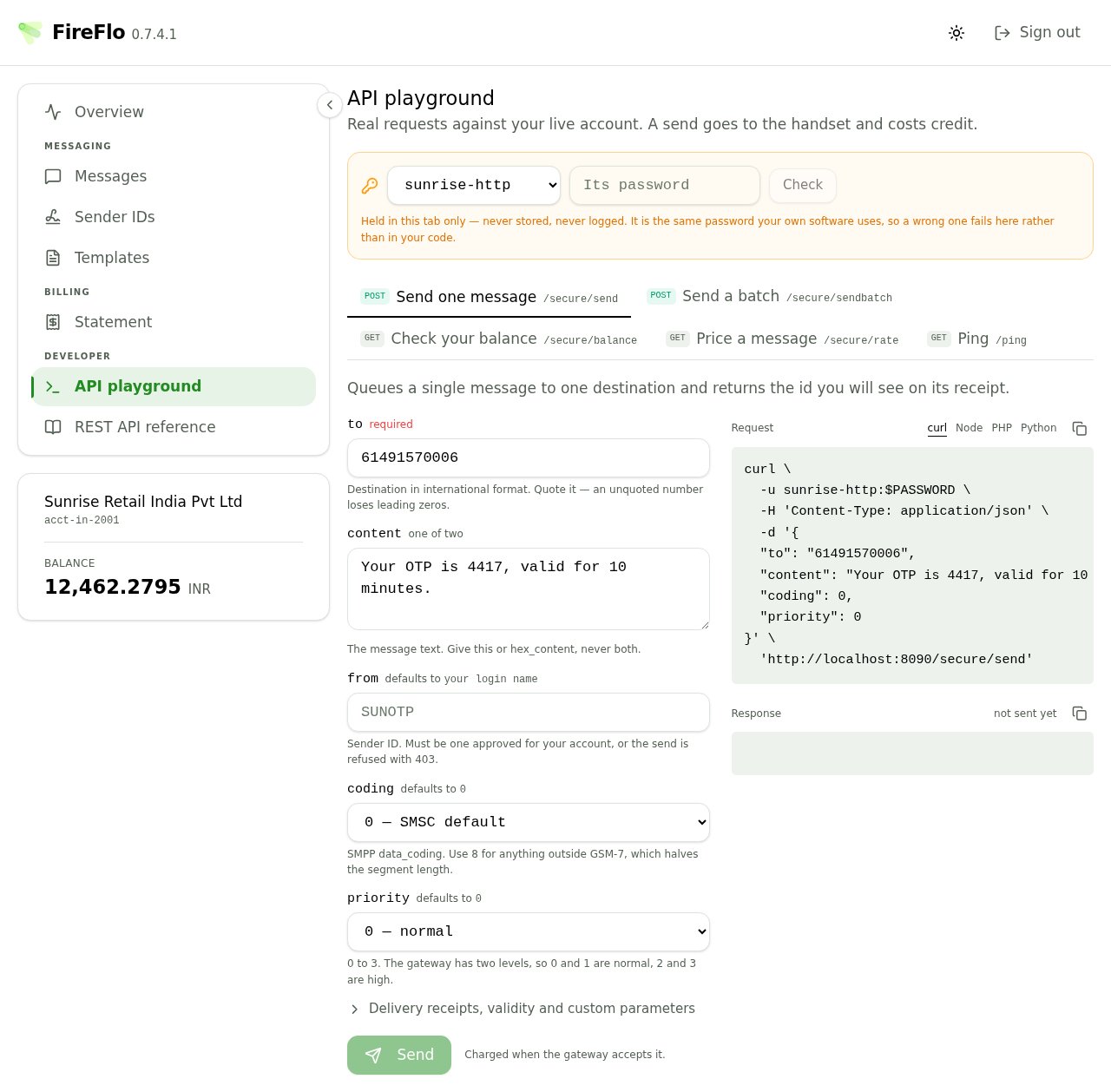
**Real requests against your live account. A send goes to the handset and costs credit.**
There is no sandbox. The playground exists because the gap between a documented example and a working
call is where integrations are lost — a quoted number that lost its leading zeros, a `custom_tlvs`
sent as a list instead of an object, a sender ID that was never approved. All of those fail here,
where you can see the gateway's own words, rather than in your code at three in the morning.
**A send is a send.** There is no confirmation dialog before one, deliberately — the cost is stated
in the page description and again beside the button — and no way to undo it. Point it at a handset
you own.
Pricing a message is the one call that sends nothing, charges nothing, and counts against no rate
limit. Use it freely.
 ## Connecting
Pick an API login and enter its password. It is checked against the gateway before anything else is
enabled, and a wrong one is refused in the gateway's own words rather than the panel's guess.
> Held in this tab only — never stored, never logged. It is the same password your own software uses,
> so a wrong one fails here rather than in your code.
Only HTTP logins can use this API. An SMPP login is refused with an authentication failure that reads
exactly like a wrong password.
## The five endpoints
| Endpoint | Does |
| :- | :- |
| **Send one message** | Queues a single message and returns the id you will see on its receipt |
| **Send a batch** | Queues many in one call — the response confirms acceptance only |
| **Check your balance** | What is left on the account this login bills to |
| **Price a message** | What a message would cost. Sends nothing, charges nothing |
| **Ping** | Liveness. The one endpoint needing no credentials — useful for a monitor |
Every field is labelled with its wire name, tagged required or optional with its default, and carries
a one-line note. Several of those notes exist because of a specific mistake:
* `to` — **quote it.** An unquoted number loses its leading zeros.
* `content` — give this or `hex_content`, never both.
* `from` — must be one approved for your account, or the send is refused. The picker offers only
**approved** sender IDs; pending ones are deliberately absent, because offering one you cannot yet
use would produce a refusal the form could have predicted.
* `coding` — use 8 for anything outside GSM-7, which halves the segment length.
* `validity_period` — whole minutes, not a duration string.
`custom_tlvs` has a row editor, because the JSON shape is the single most common integration error:
> Extra SMPP parameters as a JSON object — `{"0x1401": "…"}` — not a list of pairs and not a quoted
> string.
The editor also warns when two rows name the same tag: the gateway refuses the whole request rather
than choosing one for you.
## Reading the response
The response panel gives you the HTTP status, the round-trip time, and — the useful part — a
plain-English explanation of what the status means. *"Your prepaid balance will not cover the
message. Nothing was sent or charged."* is more actionable than a bare 402.
Where a send succeeded, the message id is offered with a copy button. That id is what will appear on
the delivery receipt and in your [message list](/developers/portal/messages-and-statement).
Alongside, a **Request** panel shows the same call as curl, Node, PHP or Python, filled in with your
own base URL and login. Copy it straight into your code.
The last few calls are kept in a small history you can reload into the form. It lives in the tab and
dies with it.
## Batches
The batch endpoint takes a JSON list, and the textarea refuses to send malformed JSON rather than
letting the gateway reject it.
**A batch response confirms acceptance, not delivery, and not even per-message acceptance.** A
message refused inside a batch — an unapproved sender, an empty balance, a rate limit — never changes
the HTTP response, and there is no endpoint to ask afterwards how a batch went.
Per-message refusals appear in **one place only**: your errback URL. If you send batches and have not
configured one, those refusals are invisible to you.
## The reference alongside it
The **REST API reference** in the same section documents every endpoint, filled in with your account's
own values, plus delivery receipts, batch callbacks, the shared error table and the custom TLV
grammar. It also handles **credential rotation** — replacing a password or API key yourself, with the
new value shown exactly once.
After rotating, the gateway reloads credentials on a timer. For roughly the next half minute your
**old** credential still works and the new one does not yet. The page tells you how long to wait.
Where an API key doubles as the username, rotating it changes the username too — so both halves of
your configuration have to change together, and there is no grace period.
This documentation is built and hosted on [Mintlify](https://mintlify.com), a developer documentation platform.
## Connecting
Pick an API login and enter its password. It is checked against the gateway before anything else is
enabled, and a wrong one is refused in the gateway's own words rather than the panel's guess.
> Held in this tab only — never stored, never logged. It is the same password your own software uses,
> so a wrong one fails here rather than in your code.
Only HTTP logins can use this API. An SMPP login is refused with an authentication failure that reads
exactly like a wrong password.
## The five endpoints
| Endpoint | Does |
| :- | :- |
| **Send one message** | Queues a single message and returns the id you will see on its receipt |
| **Send a batch** | Queues many in one call — the response confirms acceptance only |
| **Check your balance** | What is left on the account this login bills to |
| **Price a message** | What a message would cost. Sends nothing, charges nothing |
| **Ping** | Liveness. The one endpoint needing no credentials — useful for a monitor |
Every field is labelled with its wire name, tagged required or optional with its default, and carries
a one-line note. Several of those notes exist because of a specific mistake:
* `to` — **quote it.** An unquoted number loses its leading zeros.
* `content` — give this or `hex_content`, never both.
* `from` — must be one approved for your account, or the send is refused. The picker offers only
**approved** sender IDs; pending ones are deliberately absent, because offering one you cannot yet
use would produce a refusal the form could have predicted.
* `coding` — use 8 for anything outside GSM-7, which halves the segment length.
* `validity_period` — whole minutes, not a duration string.
`custom_tlvs` has a row editor, because the JSON shape is the single most common integration error:
> Extra SMPP parameters as a JSON object — `{"0x1401": "…"}` — not a list of pairs and not a quoted
> string.
The editor also warns when two rows name the same tag: the gateway refuses the whole request rather
than choosing one for you.
## Reading the response
The response panel gives you the HTTP status, the round-trip time, and — the useful part — a
plain-English explanation of what the status means. *"Your prepaid balance will not cover the
message. Nothing was sent or charged."* is more actionable than a bare 402.
Where a send succeeded, the message id is offered with a copy button. That id is what will appear on
the delivery receipt and in your [message list](/developers/portal/messages-and-statement).
Alongside, a **Request** panel shows the same call as curl, Node, PHP or Python, filled in with your
own base URL and login. Copy it straight into your code.
The last few calls are kept in a small history you can reload into the form. It lives in the tab and
dies with it.
## Batches
The batch endpoint takes a JSON list, and the textarea refuses to send malformed JSON rather than
letting the gateway reject it.
**A batch response confirms acceptance, not delivery, and not even per-message acceptance.** A
message refused inside a batch — an unapproved sender, an empty balance, a rate limit — never changes
the HTTP response, and there is no endpoint to ask afterwards how a batch went.
Per-message refusals appear in **one place only**: your errback URL. If you send batches and have not
configured one, those refusals are invisible to you.
## The reference alongside it
The **REST API reference** in the same section documents every endpoint, filled in with your account's
own values, plus delivery receipts, batch callbacks, the shared error table and the custom TLV
grammar. It also handles **credential rotation** — replacing a password or API key yourself, with the
new value shown exactly once.
After rotating, the gateway reloads credentials on a timer. For roughly the next half minute your
**old** credential still works and the new one does not yet. The page tells you how long to wait.
Where an API key doubles as the username, rotating it changes the username too — so both halves of
your configuration have to change together, and there is no grace period.
This documentation is built and hosted on [Mintlify](https://mintlify.com), a developer documentation platform.